Part 1 gave the lab a record and a protocol. Part 2 gave it a judge, hands and a clock. With those, work starts, gets reviewed and lands without me at the desk.
That raises two new problems. How does a lab that runs without me reach me, and how do I answer it when I'm not at a keyboard? And because the record is now the most important data I have: what happens on the day something breaks? This part is the last four slots. Three are about reach, and one is about getting it all back.
6. Calendar and notifications
A system that works on its own has to tell you things. If it tells you everything, you stop reading, and the one message that mattered goes with the rest.
Every channel needs a rule for what it's not for.
The job: show me what's coming, tell me when something happened, and stay quiet the rest of the time.
Ours: three channels, each with one job.
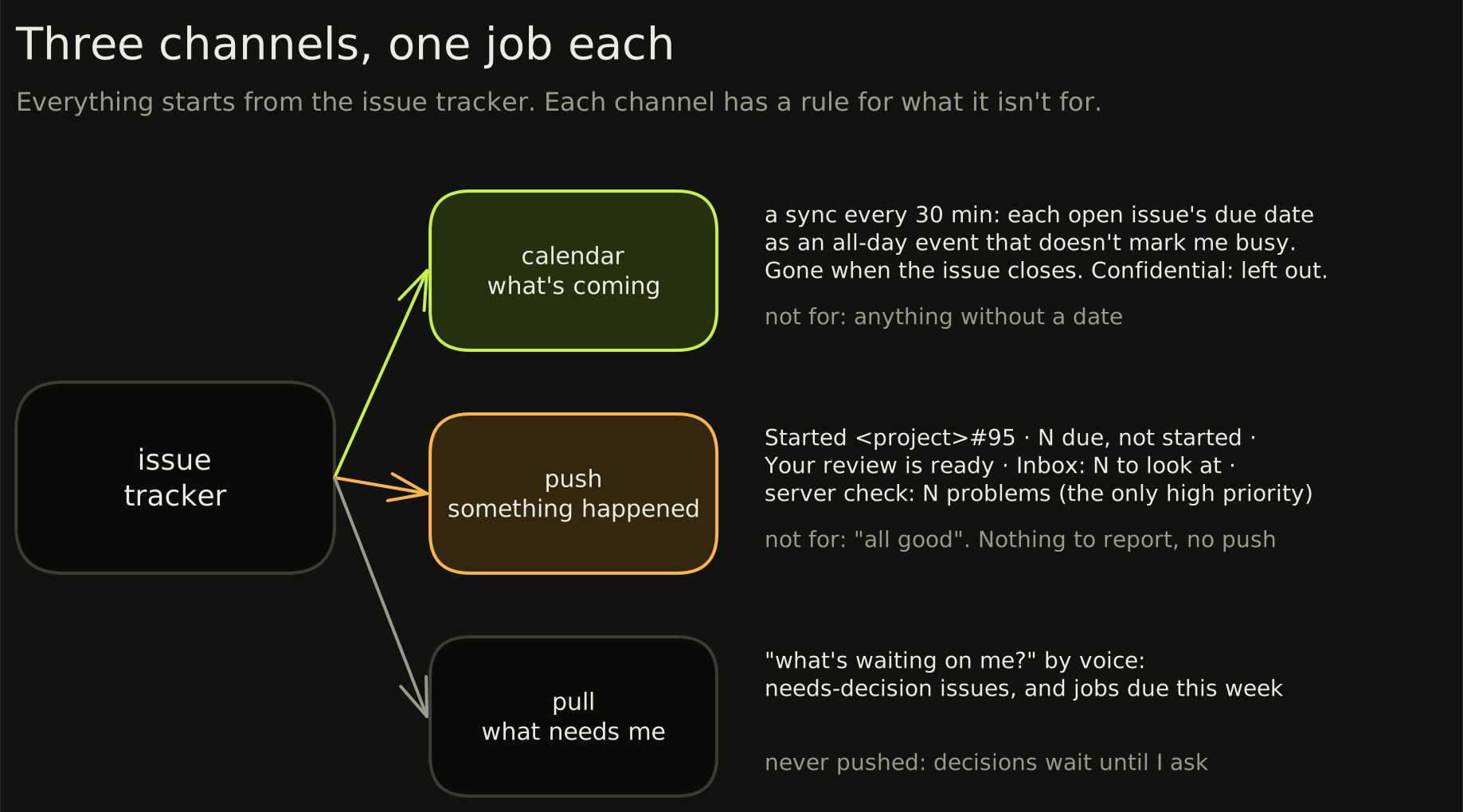
The calendar shows what's coming. Part 2 said the board and the calendar share one date. A sync puts every open issue with a due date on a calendar of its own, every 30 minutes. The events don't mark me busy, and each one says "edit the issue, not this event". When an issue closes or loses its date, its event goes. Confidential issues stay off it, because the calendar lives outside the lab.
Pushes say something happened. The lab's own pushes go to a private topic on my phone, and the list of what may push is short: a session started a scheduled issue, an issue is due but couldn't start, the morning review is ready, the inbox sweep found something, a server check found a problem. Only the server check is high priority. (The content channels have their own pushes, with their own rules.) Here are real lines from the logs:
2026-10-18 21:03:40 ntfy   Started <project>#95
2026-10-29 07:30    ntfy   Daily review not written yet
2026-10-31 07:30    ntfy   Your review is ready
The rule that keeps it quiet: nothing to report means no push. No "all good" pings from the lab, and the review pushes at most once a day for each kind.
Decisions are never pushed. An issue that needs me doesn't buzz. I ask "what's waiting on me" when I have a minute, and get the list.
Two of these exist because something got missed. The inbox sweep was added after a security notice from a provider went unseen. It only reads, and when something needs action it pushes a count and one line per item. The review push used to say only that the review was ready. At 07:30 the Mac is awake but I'm not at it, so now it says what to do from the phone: open Claude, start voice, and say "do my review".
7. A voice bridge
The questions come when I'm away from the desk: in the car, between things, on the phone. A terminal on a phone is useless and an issue board is slow. In the car, I can only talk.
If you can only reach your system at a desk, you're the bottleneck again.
The job: let me ask what's happening and decide things by voice, from anywhere.
Ours: a small remote MCP server, added as a connector in Claude's phone app. Voice mode then has the lab's tools: read the map, list what's waiting on me, read an issue, check the sites, see which sessions are busy, file something, add a note, decide, hand off, ask the chief of staff, and do the morning review.
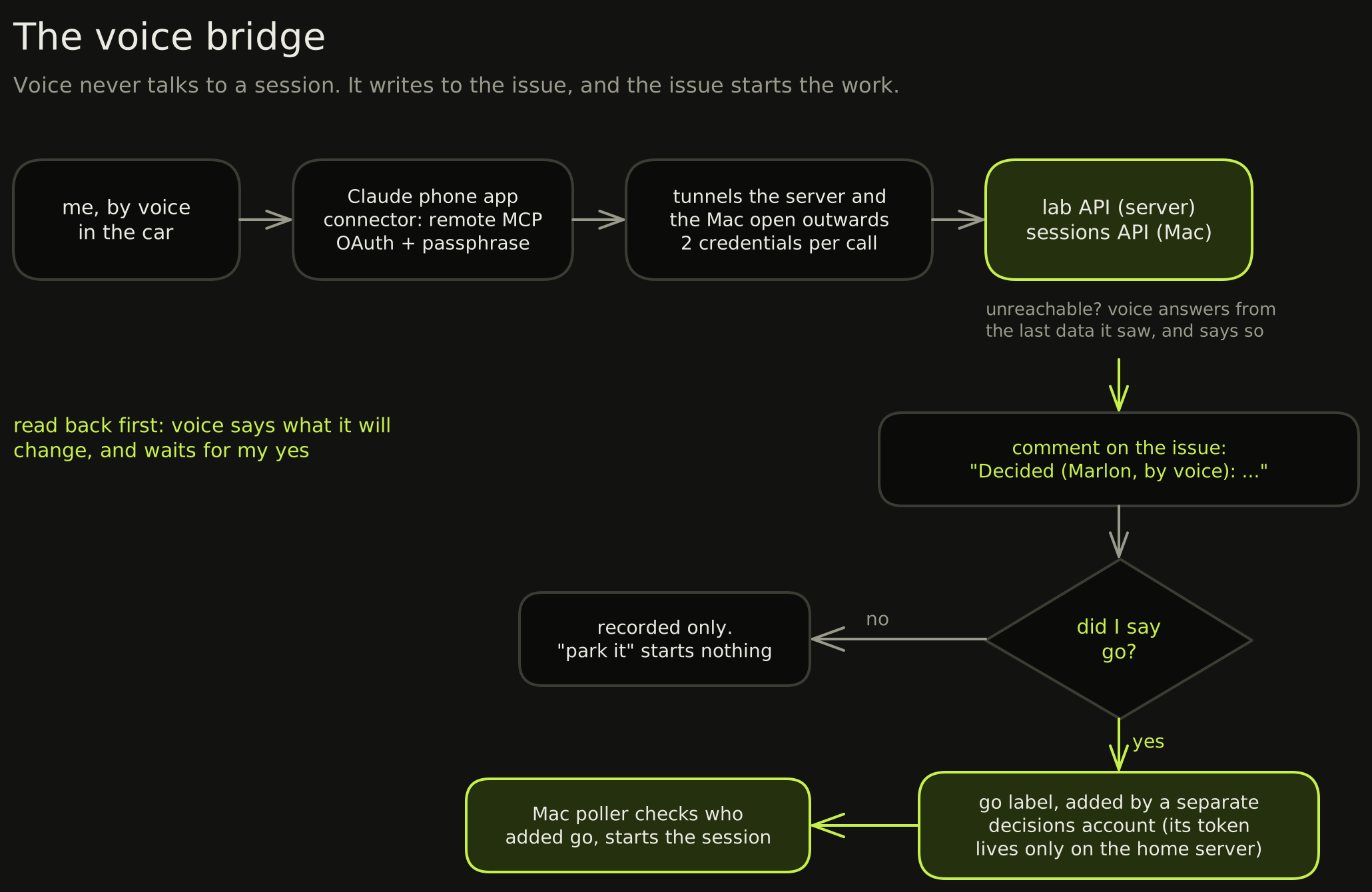
The connector reads live, and it changes things only after a read-back. That rule is in the server's own instructions to the model: say what you're about to change, and wait for my yes. Then a decision becomes a comment on the issue, "Decided (Marlon, by voice): …". A decision on its own starts nothing, because "park it" and "no" are decisions too. Only when I say go does a go label get added, by a separate account whose token lives only on the home server. That's the label part 1's check trusts, so a voice go is as good as one from my keyboard, and no better.
Nothing in the lab answers the internet directly. The home server and the Mac each open a tunnel outwards, the server for lab data and the Mac for sessions, and every call through either needs two credentials. If the server can't be reached, voice says so and answers from the last data it saw, with when it last changed.
What broke:
- The first version typed into sessions. A voice hand-off sent its prompt straight to a project's session. It worked, but it left no record on the issue, and it gave the phone a way to command a session directly. Now a hand-off is a comment plus the
golabel, and the poller from part 2 starts the work. The connector writes to the source of truth and nothing else. - A decision used to start work. "Decide" handed off by default, so a "no" on a parked issue could have woken a session. Now a decision only records, unless I say go.
- The first sign-in from the phone failed. The sign-in form depended on a short-lived browser cookie, and the phone app's in-app browser can drop it. The form now validates the request from the URL instead.
8. Always reachable
Voice covers questions and decisions. Sometimes I need the board itself, a service's page or a log, from the phone, on mobile data, away from home.
The lab should be one private network that comes with me, not a place I have to be.
The job: reach every lab service from the phone or laptop wherever I am, without opening it to the internet.
Ours: Tailscale. The phone, the laptop and the home server are on one private network. The lab's internal names resolve on the phone anywhere, through a second DNS server that listens only on that network and refuses every other lookup, so it's never an open resolver.
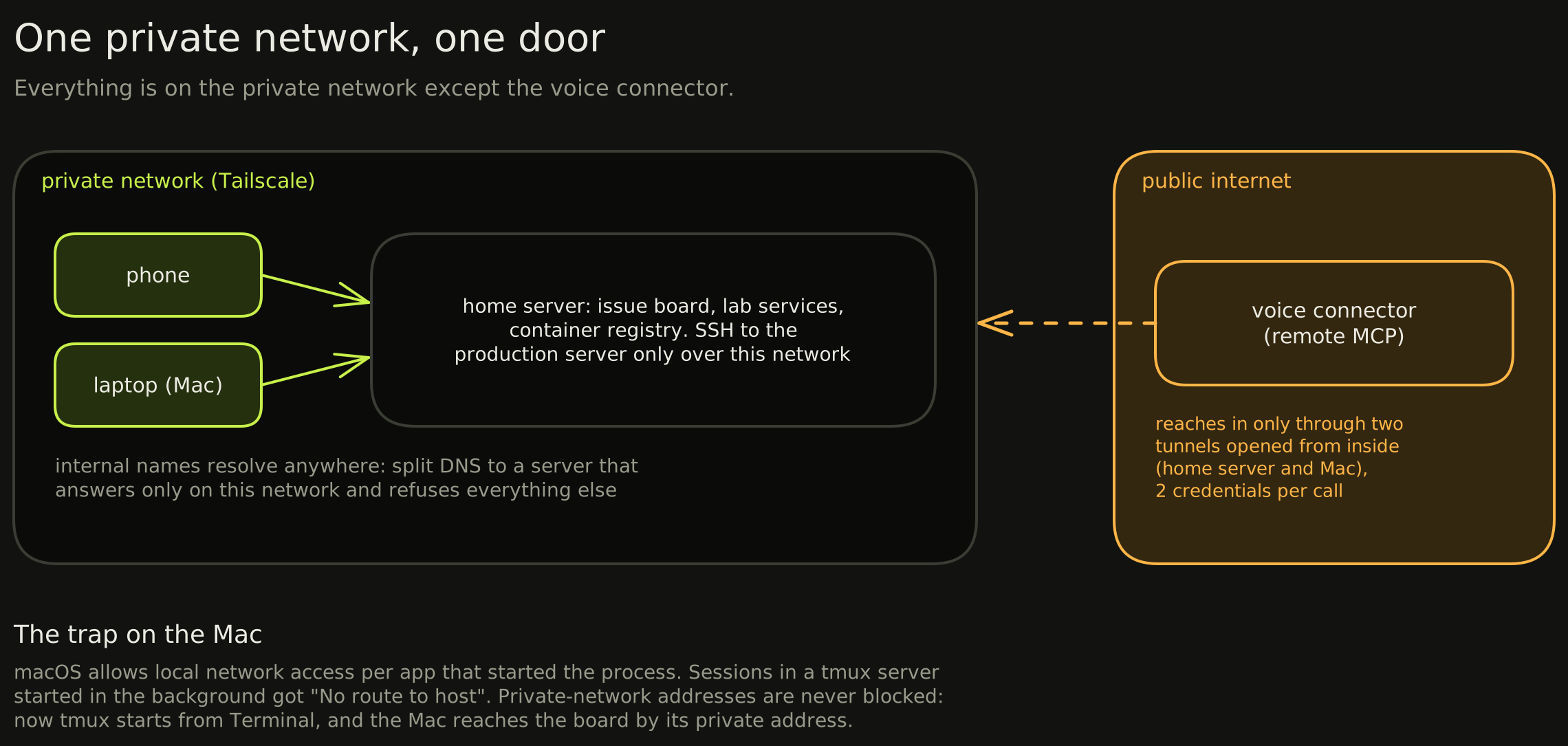
The line between public and private is short enough to list. On the private network only: the issue board, the services, the container registry and SSH to the production server. On the internet: the voice connector, which reaches in only through the two tunnels the home server and the Mac open outwards. Nothing else.
What broke:
- Names that worked at home didn't work on 5G. The internal names only resolved on the home network, so a service I could open on Wi-Fi was gone on mobile data. The fix was split DNS: the private network sends those names to the home server's private-only DNS.
- The Mac blocked its own sessions. macOS decides local network access per app that started a process, not per user. The sessions ran in a background tmux server with no app behind it, so every tool in them got "No route to host" to the home network. Addresses on the private network are never blocked. Now the tmux server is started from Terminal, which is allowed, and the Mac reaches the issue board through its private address.
9. Underneath
Nobody picks an assistant for its backups. But slot 1 is now the most important data you have: every task, decision and rule lives there.
This is the slot you only notice when it's missing.
The job: keep the rest running, and bring it back when it doesn't.
Ours: three pieces, each boring on purpose.
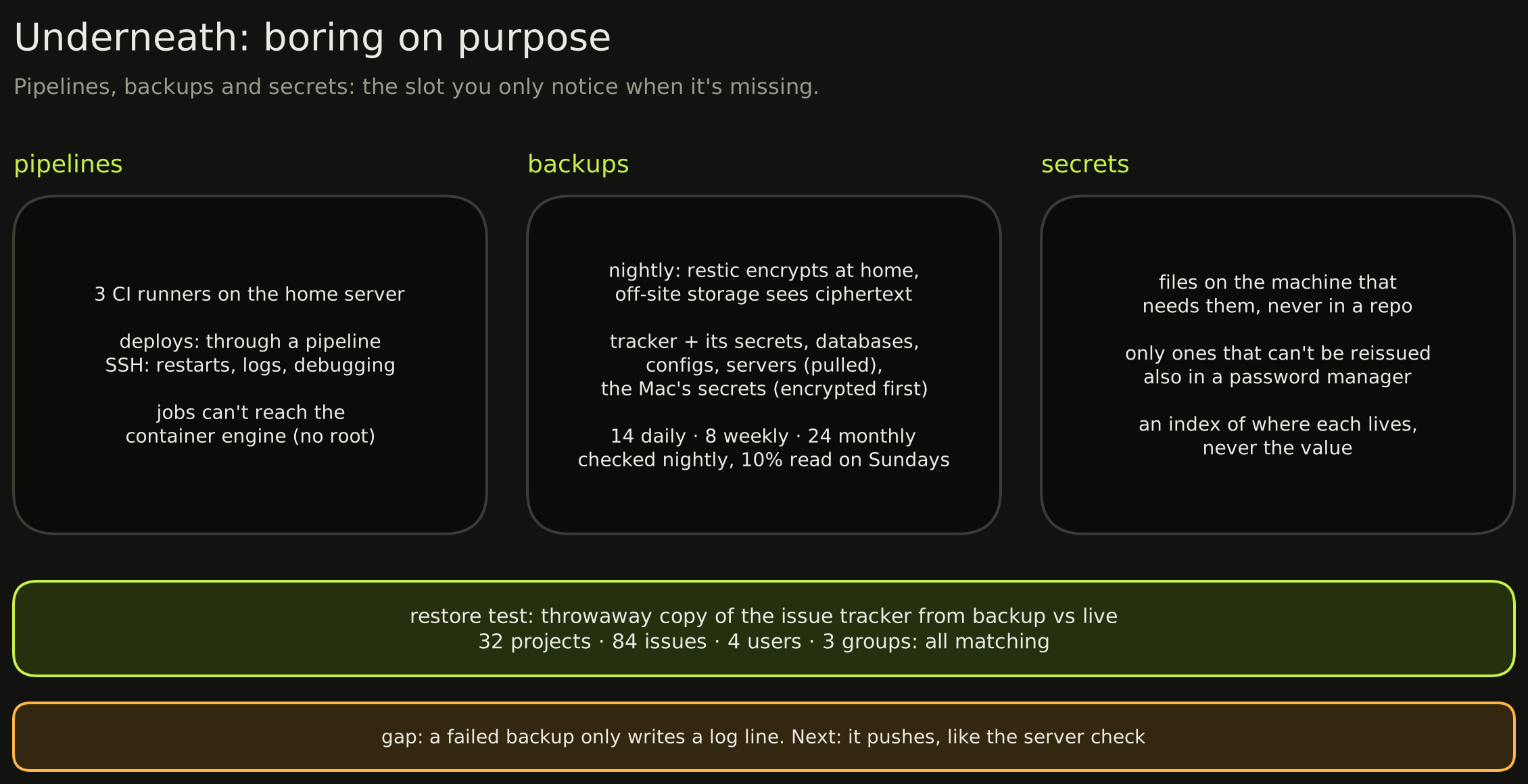
Pipelines. Three CI runners on the home server. Anything that deploys goes through a pipeline, and SSH is for restarts, logs and live debugging. The runners can't reach the server's container engine, because that would make every job root on it.
Backups. Every night, restic encrypts on the home server and sends the result off-site, so the storage provider only ever holds ciphertext. It takes the issue tracker and the secrets file it can't be restored without, the databases, configs, what's pulled from the servers, and the Mac's own secrets, encrypted on the Mac before they leave. The servers hold no backup credentials: the home server pulls from them, with a key that can only run one command.
Secrets. In files on the machine that needs them, never in a repo. Only the ones that can't be reissued also go in a password manager. An index lists where each one lives, never the value.
A backup you haven't restored is a hope. The full restore test rebuilt the issue tracker from backup in a throwaway instance and compared it with the live one: 32 projects, 84 issues, 4 users and 3 groups, all matching, and every stored secret readable.
What broke:
- The restore test used up the storage account's daily download cap. Both nightly backups read from storage before they write, and they share that cap, so they'd have failed until it reset at midnight UTC, which is the middle of the day here. The download cap is now about 10 GB a day, above the few GB a full restore needs.
- The pipelines had nothing behind them for 17 days. After the home server was rebuilt, the issue tracker came back without its CI runners. No project's pipeline could run, so "deploys go through the pipeline" was a rule with nothing behind it. Three runners came back, and the rebuild runbook gained the step.
- Backups don't tell me when they fail yet. Today a failed night only writes a log line. That's next: a failure should push, like the server check does.
The whole series in one line each
- A single source of truth: every task is an issue.
- Labels as the protocol: a few labels say what happens next.
- A chief of staff: an agent makes the routine calls, and I review them each morning.
- A session per project: one worker per project, one issue at a time.
- The on-the-date nudger: a plain script starts work on the day.
- Calendar and notifications: three channels, each with a rule for what it isn't for.
- A voice bridge: decisions by voice, written to the issue like any other.
- Always reachable: one private network, and one door to the internet.
- Underneath: pipelines, backups and secrets, restored at least once.
Each slot names a job, not a product, so any of them can be swapped without touching the rest. If you build one, start with slot 1 and add the others as the work asks for them. That's how this one grew.